
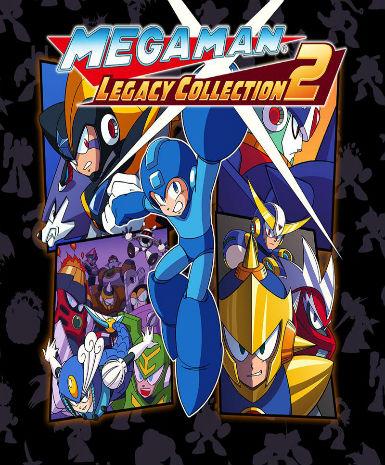
Mega Man: Legacy Collection 2
About this licence
Mega Man: Legacy Collection 2 is a digital compilation of classic action-platformer games from the Mega Man series. This edition includes Mega Man 7, Mega Man 8, Mega Man 9, and Mega Man 10, offering hours of challenging gameplay. Each game features unique robot masters, weapons, and levels to conquer. The collection provides enhanced features like save states and museum modes for an improved experience. Relive the nostalgia of these iconic titles with modern conveniences. The collection is delivered as a Steam key for activation on the Steam platform. The key provides lifetime access to the included games after activation. This is a global edition, playable in all supported regions where Steam operates. No physical media is included; this is a digital-only product. Each purchase includes a valid VAT invoice for your records. The product comes with activation support in case of any issues. The licence does not automatically renew or extend beyond the stated lifetime access. This is a genuine software licence acquired for lawful resale. The collection is ideal for both longtime fans and newcomers to the series. To activate, redeem the Steam key in your Steam client under 'Add a Game'. The games will be permanently added to your Steam library after activation. All included titles retain their original gameplay and challenge. Enjoy the classic Mega Man experience with the convenience of modern platforms. This collection is a perfect way to experience these beloved retro games.
- Includes Mega Man 7, 8, 9, and 10
- Global Steam key for lifetime access
- secure order-page delivery
- Enhanced features like save states
- Perfect for retro gaming fans
Frequently asked questions
How do I activate Mega Man: Legacy Collection 2?
You activate the game by redeeming the Steam key in your Steam client. Open Steam and click 'Add a Game' in the bottom left corner, then select 'Activate a Product on Steam'. Enter the key when prompted. The games will be permanently added to your library after successful activation. The key is delivered according to the timing shown before payment via email after purchase.
What does the global region mean for this product?
The global region means the Steam key can be activated and played in all supported regions where Steam operates. There are no geographical restrictions on activation or gameplay. The key will work regardless of your country, as long as Steam service is available there. This is not limited to any specific continent or territory.
How is the product delivered after purchase?
The product is delivered digitally via secure order-page delivery. You will receive an email containing your Steam activation key shortly after completing your purchase. There is no physical shipment involved. The email typically arrives within minutes, though delivery times may vary slightly depending on your email provider.
What support is included with my purchase?
Your purchase includes activation support for the Steam key. If you encounter any issues redeeming or accessing your game, support is available to assist you. Each purchase also includes a valid VAT invoice for your records. The product comes with a genuine software licence for lawful use.
Does the licence expire or require renewal?
The licence provides lifetime access to the games after activation. There is no expiration date or need for renewal. Once activated on your Steam account, the games remain permanently available in your library. The licence does not automatically renew as it does not expire.
Product details
| Brand | CT |
|---|---|
| Category | All Games |
| Platform | Steam |
| License | Standard |
| Activation region | Global |
| Delivery | Digital key — secure order-page delivery |
| Invoice | EU invoice included |
System requirements
Product-specific requirements have not yet been verified. Check the publisher’s compatibility information before purchase or ask support to confirm your setup.
Activation & installation overview
- 1Download the installer from the vendor’s official website.
- 2Run the installer and follow the on-screen steps.
- 3Enter your license key when prompted to activate.
- 4Restart if requested — you’re ready to go.
This is a general activation overview; publisher screens can vary by edition and version.
Top in All Games
See all SteamCyberpunk 2077 | Digital Version | PCAll Games
 SteamGrand Theft Auto IV Complete Edition EU PC Steam CD KeyAll Games
 SteamGrand Theft Auto IV Complete Edition PC Steam CD KeyAll Games
 SteamGrand Theft Auto IV Complete Edition PC Steam GiftAll Games
 AlienAlien: Isolation (Collection)All Games
 NeedNeed for Speed Most Wanted Limited Edition PC EA App CD KeyAll Games
 SteamNBA 2K14 PC Steam CD KeyAll Games
 PlayStationPlayStation Plus Essential 3 Months Subscription UKAll Games
Customer reviews
No reviews yet